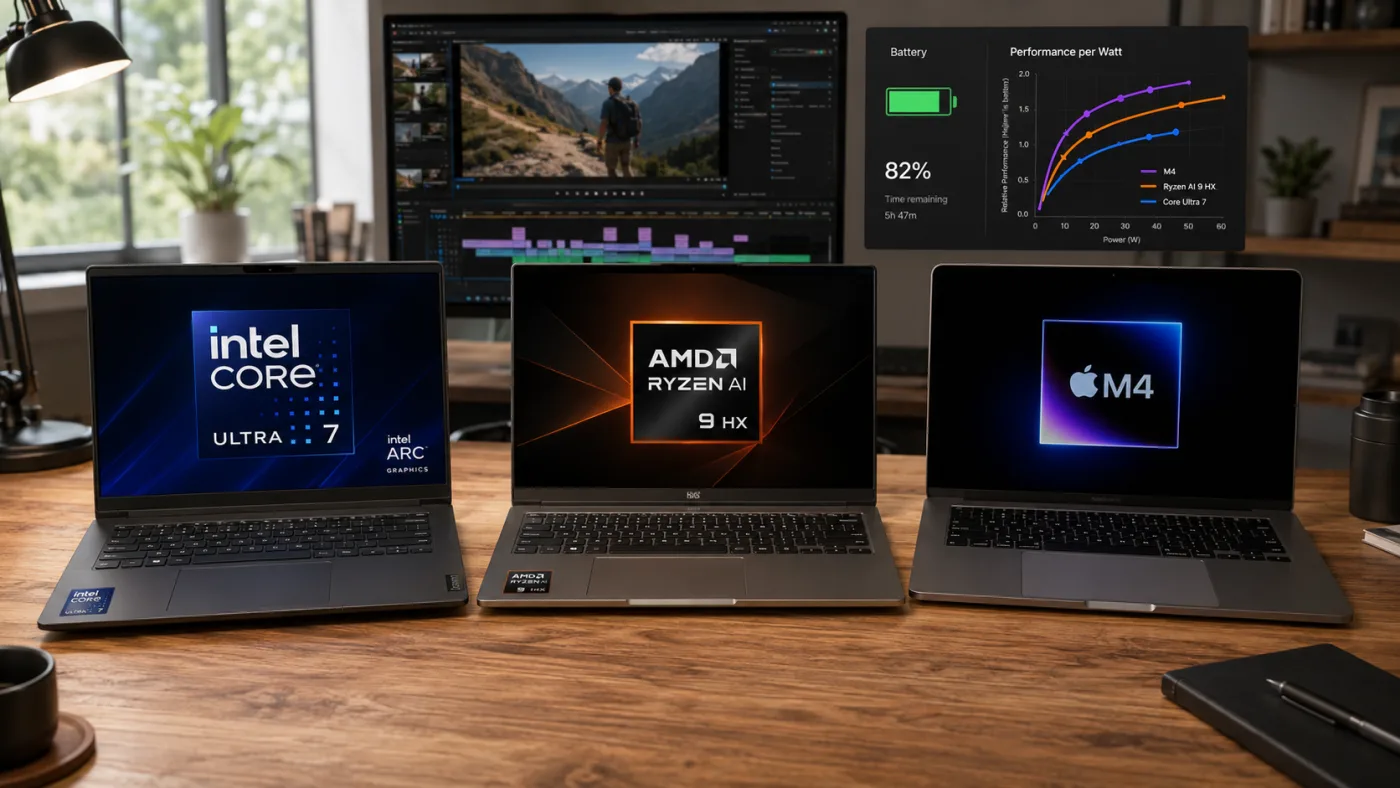
Buying a laptop in 2026 is more confusing than ever. You have Intel’s Core Ultra series (with built-in AI accelerators), AMD’s Ryzen AI 300 series, and Apple’s M-series chips (M4, M4 Pro, M4 Max). Each claims to be the fastest, most efficient, or most intelligent. But what do these claims mean for a student, a working professional, or a creative user in India?
Here’s the reality: there is no single “best” processor. The right choice depends entirely on what you do – coding, video editing, office work, gaming, or just browsing. A chip that excels at battery life might struggle with sustained rendering. A chip that crushes multi-core tasks might be overkill (and overpriced) for someone who only uses Word and Chrome.
In this guide, we’ll explain the real-world differences between Intel Core Ultra, AMD Ryzen, and Apple M-series laptops in 2026. We’ll cover performance, battery backup (critical for Indian users who face power cuts and long commutes), software compatibility, and value for money. No jargon overload – just practical advice to help you choose wisely. Prices and offers change, so always check current deals before buying.
Quick Summary
- Apple M-series (M4/M4 Pro) wins on battery life and raw creative performance – but only if you stay within macOS ecosystem.
- AMD Ryzen AI 300 offers the best multi-core value for Windows users, especially for programming, 3D rendering, and multitasking.
- Intel Core Ultra 200 series has the strongest single-core speed and Thunderbolt 5 support – ideal for professionals who need fast external I/O.
- For students and general home use, AMD’s Ryzen 7 or Intel Core Ultra 5 are the sweet spot – avoid Ultra 9 unless you do heavy work.
- Check software compatibility: some engineering and finance tools still prefer Intel; creatives benefit from Apple’s media engines.
Why This Laptop Chip Comparison Matters
In 2026, the processor is no longer just about clock speed and core counts. It’s about integrated AI engines (NPUs), power efficiency, graphics performance, and how well the chip communicates with RAM and storage. A laptop with a “faster” chip on paper can feel slower if the platform isn’t optimised.
For Indian buyers, battery life is often a top priority – especially for students and frequent travellers. Apple’s M-series famously sips power, but newer Intel and AMD chips have closed the gap significantly. Also, many people don’t realise that a laptop’s cooling design matters as much as the chip itself. A powerful processor in a thin, fanless chassis will throttle, wasting its potential.
This guide will help you navigate the three major ecosystems. We’ll also touch on the Intel vs AMD vs Apple debate for specific use cases like coding, video editing, data science, and casual use. By the end, you’ll know exactly which processor family to target for your budget and needs.
Key Features or Main Points
Let’s break down how these three chip families compare across the metrics that actually matter to real users.
1. Raw Performance: CPU and GPU
Intel Core Ultra 200 series (Arrow Lake): Intel has redesigned its architecture with performance-cores (P-cores) and efficiency-cores (E-cores) plus low-power E-cores for background tasks. Single-core performance is class-leading – great for tasks like launching apps, compiling small code projects, or running Excel macros. Integrated graphics (Intel Arc) have improved massively, now capable of light 1080p gaming. However, multi-core performance trails AMD at the same power level.
AMD Ryzen AI 300 series (Strix Point): AMD continues its multi-core dominance. A Ryzen AI 9 365 or 9 HX 370 can easily beat Intel in rendering, code compilation, and virtual machines. The integrated RDNA 3.5 graphics are significantly better than Intel’s – you can even play games like Valorant or GTA V at decent settings without a discrete GPU. The new “AI” branding means a powerful NPU (up to 50 TOPS) for on-device AI features.
Apple M-series (M4, M4 Pro, M4 Max): Apple’s unified memory architecture gives it a unique advantage – the CPU, GPU, and Neural Engine share a fast pool of RAM, reducing bottlenecks. For video editing (Final Cut Pro, DaVinci Resolve), 3D rendering (Blender), and music production (Logic Pro), M-series chips punch far above their TDP. However, performance can drop in poorly optimized Windows apps running via emulation. M4 Max is a beast but costs ₹3 lakh+.
Real-world takeaway: For 90% of users, all three are overkill. A Core Ultra 5 or Ryzen 7 will handle everything except heavy 4K video work or 3D rendering. Don’t pay for an Ultra 9 or M4 Pro unless you know you need it.
2. Battery Life – The Indian Reality
This is where Apple still leads, but the gap has narrowed. An M4 MacBook Air can easily last 15-18 hours of mixed use – that’s 2-3 full workdays for many people. Even the M4 MacBook Pro hits 20+ hours. For Indian conditions (unstable power, long train commutes), that’s a genuine comfort.
On the Windows side, AMD Ryzen AI 300 laptops generally beat Intel Core Ultra in battery tests. A Ryzen 7 laptop with a 60Wh battery can deliver 10-12 hours of light use. Intel’s Core Ultra 200 series has improved but still trails AMD by about 10-15% in efficiency. However, both are far better than older 12th/13th Gen Intel chips.
But here’s the catch: battery life also depends on the laptop model, screen resolution, and software. A high-refresh-rate OLED display will drain faster than a 60Hz IPS panel. Always look for reviews that test battery with your typical workload – not just video looping tests.
Verdict: Apple wins if battery is your absolute priority. If you want Windows, choose Ryzen over Intel for longer runtime.
3. AI and On-Device Features (NPU)
2026 is the year of the AI PC. All three platforms now have dedicated Neural Processing Units (NPUs). Intel’s NPU in Core Ultra delivers around 10-15 TOPS (trillion operations per second), AMD’s Ryzen AI can hit 30-50 TOPS, and Apple’s Neural Engine is roughly 40+ TOPS. What does that mean for you? Very little today, but it will matter in 1-2 years.
Currently, Windows 11 uses NPUs for background blur in video calls, live captions, and some photo editing effects. Apple uses NPUs for Spotlight search, subject isolation in Photos, and real-time transcription. Most third-party apps don’t yet leverage NPUs heavily. So don’t buy a laptop solely for its AI horsepower unless you’re a developer working on AI models.
For most buyers, treat NPU as a future-proofing feature, not a dealmaker.
4. Software and Ecosystem Lock-in
This is often the deciding factor. Apple M-series laptops only run macOS. You cannot dual-boot Windows or Linux natively (only via virtualisation, which is slower). If your work requires Windows-only software – many engineering tools (AutoCAD, SolidWorks), some tax and banking software, or legacy corporate apps – an Apple laptop will frustrate you.
Windows laptops with Intel or AMD run the full Windows 11 ecosystem, including WSL (Windows Subsystem for Linux) for developers. You also have a wider choice of hardware – from ₹40,000 thin-and-lights to ₹3,00,000 workstations. Gaming is also vastly better on Windows due to game compatibility.
Apple’s ecosystem advantage is for users already deep in iPhone, iPad, and iCloud. Features like Handoff, universal clipboard, and AirDrop are genuinely convenient. Also, creative software like Final Cut Pro, Logic Pro, and many audio plugins are Mac-only or better optimised on Mac.
Takeaway: Choose your OS first, then the chip. If you need Windows, compare Intel vs AMD. If you prefer macOS or need Apple-specific software, go M-series.
5. Price and Value in India
Apple M-series laptops carry a premium. The cheapest M4 MacBook Air (13-inch, 16GB RAM, 512GB) starts around ₹1,10,000. For that price, you can get a Windows laptop with twice the RAM and storage, or a discrete GPU. However, Macs hold their resale value better and often last 5-7 years with solid performance.
In the Windows world, AMD laptops are generally ₹5,000-₹10,000 cheaper than Intel equivalents at the same performance tier – because Intel’s brand premium and marketing costs add up. For budget-conscious students, an AMD Ryzen 5 or 7 laptop offers incredible value. For example, a Ryzen 7 8845HS laptop with 16GB RAM is available around ₹75,000-₹85,000, while a comparable Intel Core Ultra 7 laptop may cost ₹90,000+.
However, Intel often has better Thunderbolt 5 support and faster Wi-Fi 7 implementation – features that may matter if you work with external SSDs, docks, or high-speed networking.
Real-World Buying Advice
Here’s how to choose based on your specific needs, budget, and usage patterns. Always compare exact laptop models, not just chip names – a poorly built laptop will ruin any processor.
For students (general use, online classes, assignments): AMD Ryzen 5 or Intel Core Ultra 5. Look for 16GB RAM, 512GB SSD, and at least 8 hours of battery life. Avoid gaming laptops – they’re heavy and have poor battery. Budget around ₹60,000-₹80,000. MacBook Air M4 is excellent but expensive – only if you have the budget and don’t need Windows.
For programmers / software developers: If you do web dev, Python, or Java, any modern chip works. For Android development or running multiple Docker containers, prioritise multi-core performance – AMD Ryzen 7 or 9 is best. For iOS/macOS development, you need a Mac (M4 or M4 Pro). Budget ₹80,000-₹1,50,000.
For video editors and creatives: Apple M4 Pro or M4 Max is the king for Final Cut Pro. For Adobe Premiere on Windows, both Intel and AMD are close, but Intel’s Quick Sync helps with H.264/H.265 encoding. If you use DaVinci Resolve, a discrete GPU matters more than the CPU. Budget ₹1,20,000+.
For business users (Excel, email, Zoom, CRM): You don’t need a powerful chip. Intel Core Ultra 3 or AMD Ryzen 3 is enough, but aim for 16GB RAM for smooth multitasking. Prioritise build quality and battery life over CPU. Budget ₹50,000-₹70,000.
For gamers (if not buying a gaming laptop): Don’t rely on integrated graphics – buy a laptop with a discrete GPU (NVIDIA RTX 4060+ or AMD Radeon RX 7000M). Among integrated graphics, AMD RDNA 3.5 performs better than Intel Arc. However, for serious gaming, a desktop or gaming laptop with a proper GPU is always better.
General checklist: Never buy a laptop with 8GB RAM in 2026 – you will regret it. 16GB is the new minimum. Also, ensure SSD is NVMe (not eMMC or old SATA). Check that the screen has at least 300 nits brightness for outdoor use in India. And always read reviews for thermal performance – many thin laptops throttle badly.
Who Should Choose Intel Core Ultra?
- Users who need Thunderbolt 5 connectivity (e.g., multiple high-res displays, fast external SSDs).
- Professionals who rely on single-core speed – financial modelling, certain engineering simulations, latency-sensitive applications.
- Those who prefer Intel’s software optimisation (some legacy enterprise software still runs better on Intel).
- People who want the fastest integrated Wi-Fi 7 and Bluetooth 5.4.
- Users who plan to buy a laptop with a discrete GPU – Intel’s platform has slightly better GPU connectivity.
Who Should Choose AMD Ryzen AI?
- Budget-conscious buyers who want the best performance per rupee.
- Developers, data scientists, and VM users – Ryzen’s multi-core lead is real.
- Gamers without a discrete GPU – AMD’s integrated graphics are noticeably better than Intel’s.
- Users who prioritise battery life in a Windows laptop.
- Those who want on-device AI capabilities today (higher NPU TOPS).
Who Should Choose Apple M-Series?
- Creative professionals using Final Cut Pro, Logic Pro, or Apple-optimised creative tools.
- Users already invested in the Apple ecosystem (iPhone, iPad, Apple Watch).
- People who value all-day battery life above all else.
- Students who don’t need Windows and can afford the premium.
- Anyone who wants a fanless, silent, and very well-built ultraportable.
Who Should Avoid Certain Chips?
- Avoid Apple M-series if you need Windows-only software or dual-boot Linux.
- Avoid Intel Core Ultra if you’re on a tight budget – AMD offers similar or better performance for less.
- Avoid AMD if you rely heavily on Thunderbolt peripherals – while USB4 is similar, Thunderbolt 5 is faster and more reliable.
- Avoid any chip if the laptop has poor cooling – look for dual-fan designs in performance laptops.
Comparison Angle
When comparing two laptops with different chips, don’t just compare CPU model numbers. Consider these factors:
Real-world battery runtime: Look for YouTube or written reviews that test with your workload. Manufacturer claims are optimistic.
Sustained performance: Check if the laptop maintains clock speeds under load for 30+ minutes. Thin laptops often start fast then throttle.
Software compatibility: For niche engineering or scientific software, check official compatibility lists. Some tools still require Intel or specific instruction sets.
Port selection: Apple MacBooks have only USB-C/Thunderbolt ports – you may need dongles for HDMI, USB-A, or Ethernet. Windows laptops offer more variety.
Upgradability: Many modern laptops (including all Apple M-series) have soldered RAM and SSD. Choose future-proof specs upfront. Some Windows laptops still allow upgrades – an advantage for longevity.
Resale value: MacBooks hold value best. Among Windows, premium business laptops (ThinkPad, Dell XPS) resell better than budget models.
Service and warranty in India: Apple has Apple Authorised Service Providers in most cities. Dell, HP, and Lenovo have extensive networks. Some AMD or Intel ultrabooks from smaller brands may have poor after-sales support. Check before buying.
Final Verdict
There’s no universal “best” laptop chip in 2026 – only the best for your specific needs and budget. If you want a simple rule: go with Apple M4 if you can afford it, don’t need Windows, and value battery and build quality above all. For Windows users, AMD Ryzen AI 300 offers better value and efficiency than Intel Core Ultra for most people – especially students, developers, and general users. Intel Core Ultra remains a good choice if you need Thunderbolt 5, slightly better single-core speed, or have legacy software that prefers Intel.
But remember: the chip is just one part of the laptop. A well-built laptop with a Ryzen 5 and a great screen, keyboard, and battery is better than a poorly built laptop with a Ryzen 9. Always read full reviews, check for thermal performance, and prioritise RAM and storage (16GB/512GB minimum). Use NXTrendz Compare to compare full specs and user ratings across models. And as always, prices and offers change – check real-time deals, bank discounts, and exchange offers before buying.
Choose wisely, and your laptop will serve you happily for 4-5 years.
Frequently Asked Questions
Which processor is best for students in India?
AMD Ryzen 5 (7640HS or newer) or Intel Core Ultra 5. Both offer plenty of performance for assignments, browsing, and light multitasking. Prioritise 16GB RAM and 512GB SSD over a more expensive CPU. Budget around ₹60,000-₹75,000 for a solid laptop that lasts 3-4 years.
Is Apple M4 worth the extra cost over a Windows laptop?
Only if you specifically need macOS or its battery life. For the same ₹1,10,000, you can buy a Windows laptop with double the RAM (32GB), double the storage (1TB), and a better screen (OLED). If you don’t need Final Cut Pro or iOS development, a Windows laptop offers more raw value.
Can I play games on laptops without a discrete GPU?
Yes, but only light or older games. AMD Ryzen AI 300’s integrated RDNA 3.5 can run Valorant, CS2, GTA V, and even some newer titles at low settings 1080p (30-60fps). Intel Arc is slightly weaker. For modern AAA games, you need a laptop with an RTX 4060 or better.
How much RAM do I need in a laptop in 2026?
16GB is the absolute minimum for any Windows laptop or Mac. 8GB laptops should be avoided unless you only use web apps. For video editing, virtual machines, or heavy multitasking, get 32GB. Apple’s unified memory works more efficiently, but still, 16GB on a Mac is fine for most creative work.
Do Intel Core Ultra laptops still overheat?
Much less than older generations. But a thin Ultra 7 or Ultra 9 laptop can still throttle under full load. Check reviews for surface temperature and fan noise. For sustained heavy work (rendering, compiling), choose a laptop with a thicker chassis and dual fans – not an ultraportable.
Which chip gives the best Linux compatibility?
AMD Ryzen tends to have better open-source driver support, especially for integrated graphics and power management. Intel also works well. Apple M-series cannot run native Linux – only via Asahi Linux, which is still experimental. For Linux users, AMD is the safest bet.
Should I wait for next-gen chips before buying?
There’s always something new around the corner. If you need a laptop now, buy now. The performance gains from 2025 to 2026 are incremental (10-20%). You won’t feel outdated for 2-3 years regardless of which modern chip you choose.
Final tip: Always test the keyboard and trackpad before buying if you can visit a store. For programming and writing, a comfortable keyboard is more important than a 10% CPU speed difference. Also, don’t ignore the screen – a good IPS panel with >300 nits makes all the difference for eye comfort. Use NXTrendz Compare to filter laptops by these real-world features.